Archflow vs gstack
An honest comparison of two MIT frameworks that turn a coding agent into a team of specialists. gstack wins reach, review depth and the browser. Archflow reads the repository you already have — and keeps what it reads in the repo.
Archflow vs gstack: which one for a codebase you already have?
Both are MIT-licensed, both are six months old, and both turn an AI coding agent into a set of named specialists with a process between them. They overlap more than either author would like. This is the honest version of the comparison, written by the author of one of them.
The short answer: if you are one person shipping a new product as fast as you can, use gstack. It reviews harder, gives the agent a real browser, and runs on a few more tools. Archflow is worth your time for one situation: a repository that already exists, that nobody planned, that more than one person has to keep shipping.
gstack details below were checked against the repository on 2026-09-10, at v1.84.1.0. It shipped three versions the day before — verify before you quote me.
Which one should I use?
| Your situation | Use |
|---|---|
| New product, one builder, moving fast | gstack — that is exactly who it was built for |
| New product that needs personas, a roadmap and an API contract before code | Archflow — it produces all three; gstack produces none |
| You are on a tool neither supports natively | gstack — ten runtimes; Archflow’s generic package runs elsewhere, but without sub-agents or hooks |
| You want the agent to click through your app in a real browser | gstack |
| You want the hardest possible review before you ship | gstack — CEO, eng, design and DX reviews, plus a second opinion from Codex |
| An inherited repo you need to understand and plan around | Archflow |
| A team that needs to see the same plan, not one engineer’s terminal | Archflow |
| You want one artifact both the frontend and backend agent are bound to | Archflow |
If the gstack rows describe you, stop reading and go install gstack. I would rather you use the right tool than my tool.
Does gstack work on an existing codebase?
Yes, and it gets better at yours the longer you use it. That is the part most comparison posts miss.
gstack does not scan your repository up front. It reads the code when a skill needs it: /spec
has a mandatory code-reading phase before it drafts, /document-generate researches the codebase
before it writes a page, and /investigate traces data flow before it lets anyone fix anything. On
a large repo — a thousand tracked files or more — it offers once to index the code through GBrain,
Sourcebot or Graphify, and remembers if you decline.
What it learns, it keeps. Every skill session ends by logging durable learnings — patterns, pitfalls,
preferences — and /learn lets you review and prune them. In the README’s words, “Learnings
compound across sessions so gstack gets smarter on your codebase over time.”
So “gstack is greenfield-only” is false, and I am not going to build a comparison on it.
The detail that matters for the rest of this page: those learnings, the design docs from
/office-hours, the plans, the retros — all of it lives under ~/.gstack/projects/<slug>/ in your
home directory. Not in the repository. There is an optional sync that pushes it to a private git
repo so your memory follows you between machines. It follows you. It does not follow the repo.
Then what does Archflow actually do differently?
Two things, and they are the whole comparison.
It reads once, upfront, instead of a little at a time. /archflow:onboard runs nine analysis
passes in three dependency layers:
- Layer 1 — a codebase audit, a deep-dive on any docs you already have, a design-system extraction, and a route/API extraction. All in parallel.
- Layer 2 —
product-strategistwrites the project context;ux-designerandapi-contract-architectbuild on it in parallel. - Layer 3 —
dsl-generatorproduces the styled component spec;feature-plannerproduces the roadmap, backlog and release files.
Then it does the part I have not seen elsewhere: it reconciles work you have already shipped into a shipped release, so your history is populated rather than empty. If you have tickets in Jira, Notion or Linear, it can import them in the same pass via MCP. Nothing is written until you approve it.
It keeps what it reads in the repo. Everything above lands in .archflow/, committed, next to
the code it describes. A colleague who clones the repository gets the plan. A colleague who clones a
gstack project gets the code and a CLAUDE.md section that says gstack is required; the plan stayed
on your laptop.
The honest trade-off: gstack’s approach is cheaper. Nothing to keep true, nothing to review at setup, and a first session that starts in thirty seconds. Archflow’s upfront extraction costs you a slower first run and files that have to stay true. That cost only pays for itself if somebody can actually see the state it produces, which is what the next two sections are about.
What does “the plan is the runtime” mean day to day?
It means the files are not a description of the work that a human keeps in sync. They are what the agents read to decide what to build, and write back to when it is done.
gstack has a version of this — its sprint is a pipeline where /office-hours writes the design doc
that /plan-ceo-review reads, and /plan-eng-review writes the test plan that /qa picks up. The
difference is what the pipeline is made of. gstack’s unit is one feature, think to ship, and there
is no backlog, roadmap or release above it by design. Its author runs ten to fifteen of these in
parallel workspaces and manages them the way a CEO manages a team. Archflow’s unit is a release,
with stories inside it, and three consequences you can check in any Archflow repo:
One contract, two agents. docs/api-contract.md is the single source of truth. api-engineer
and ui-engineer are both bound to it with zero tolerance for deviation, and qa-engineer verifies
against it. Frontend and backend cannot quietly disagree about a field name, because neither one is
allowed to invent it. gstack has no equivalent artifact; /plan-eng-review locks architecture in
the plan doc, and the review catches drift afterwards.
Status lives in a release file. .archflow/releases/{slug}.yaml is the source of truth for story
status — not a comment in chat, not a board someone updates on Friday, not a JSONL file in one
engineer’s home directory.
Gates have verbs. A story carrying needs_design is cleared by running the design command; one
carrying needs_contract by the contract command. The readiness check is state on disk, in the
repo, not a rule you hope the model remembered.
Do I have to read YAML to see any of this?
No, and this is the part I would push hardest if you are deciding.
Durable plan state has an obvious failure mode: files nobody opens. So the same .archflow/ folder
has a local workspace over it. /archflow:studio prints a URL — http://localhost:3456 — and the
roadmap becomes a board, the release becomes a pipeline, and the agents work in front of you instead
of behind a scroll of terminal output.
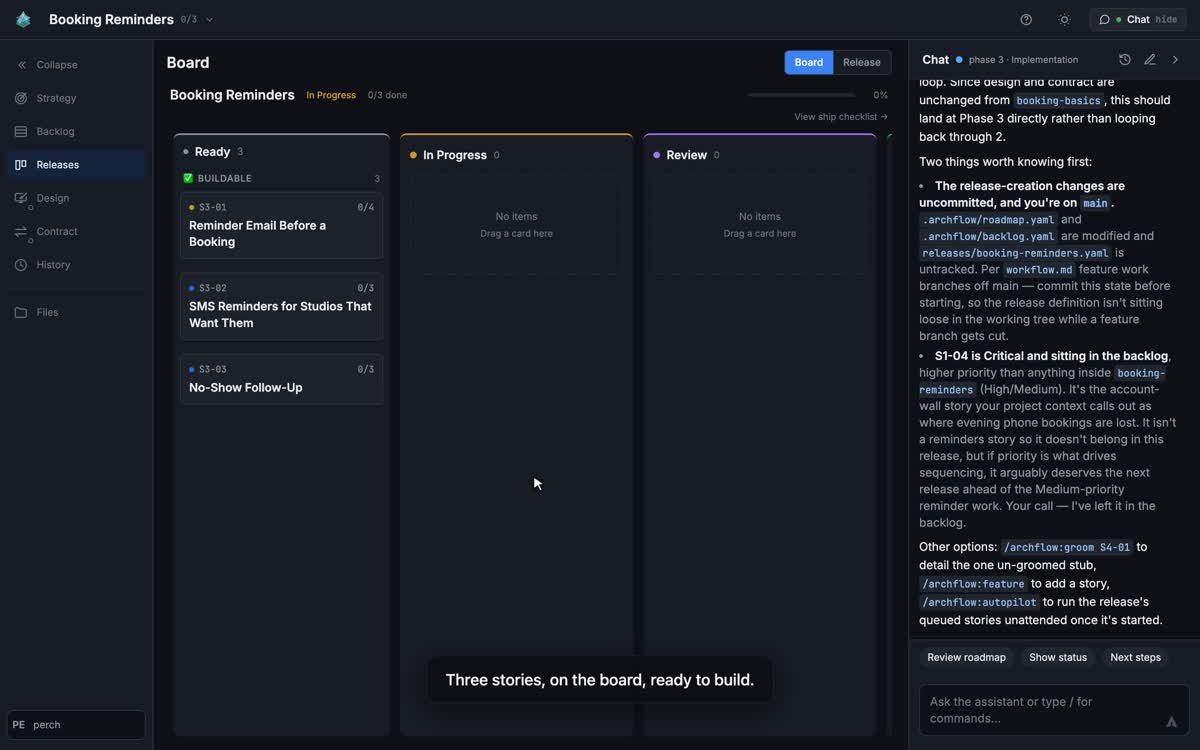
A release board: three stories groomed and ready to build, with the assistant flagging what is still
uncommitted on main.
The part that matters for a first look: you do not have to onboard in the terminal first. Point
Studio at a repo with no .archflow/ and it offers to onboard it from a button. The nine analysis
passes run in the browser, and you watch the board fill in with what they found in your code. You
approve the artifacts; nothing is written until you do.
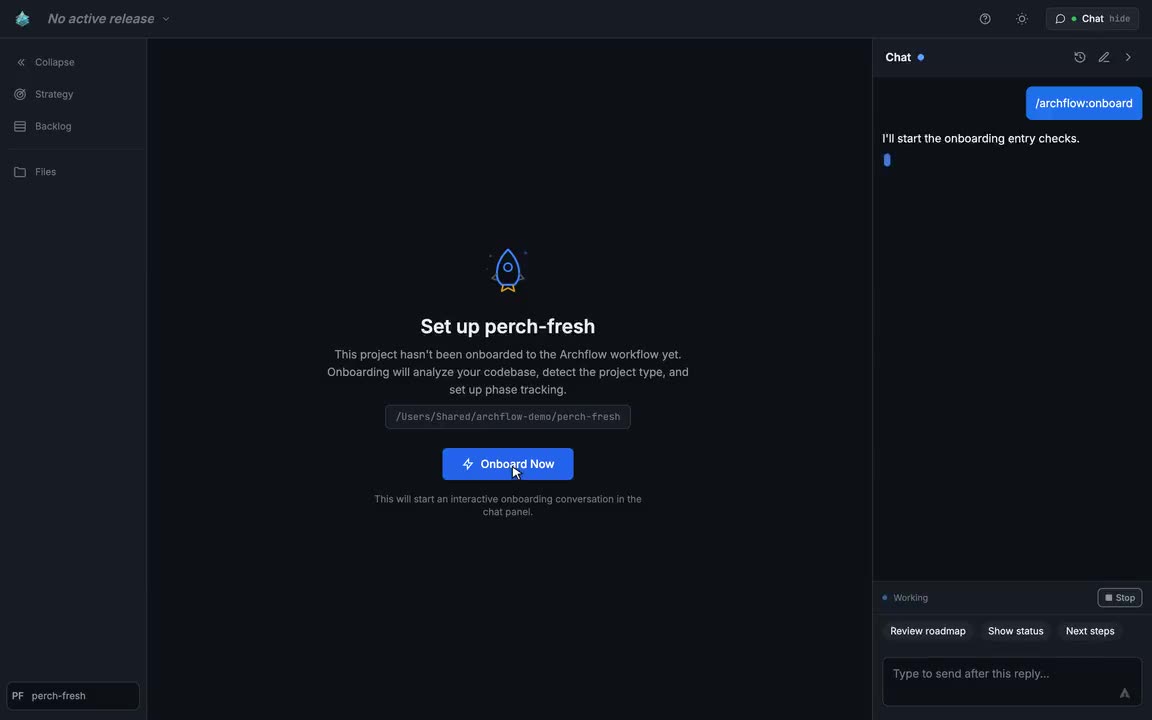
A repository with no .archflow/ yet. One button, and the analysis passes start in the panel beside
the board.
gstack has a browser too, and it is a better one for what it does: the agent drives your real Aside session or a bundled Chromium to test the app you are building. Studio is a browser for the plan. They are not the same thing, and you could run both.
Studio is beta; features are still landing. It needs Claude Code, because it drives the claude
binary; the rest of Archflow does not. It runs locally, and nothing leaves your machine — no server
holds, caches or brokers your .archflow/ folder. It is also what ships Studio itself, so it
is not fragile, but it is not finished either.
Where gstack wins, plainly
- Reach. Claude Code, Codex CLI, OpenCode, Cursor, Factory Droid, Kiro, Slate, OpenClaw, Hermes
and GBrain, with a two-kilobyte instruction digest for anything that reads an
AGENTS.md. Archflow runs on Claude Code, OpenAI Codex, GitHub Copilot CLI, Cursor, Gemini CLI and OpenCode, plus a genericAGENTS.mdand Agent Skills package that runs the roles serially with no sub-agents and no hooks. The overlap covers most teams; gstack still covers more, and has for longer. - The browser.
/qaopens a real browser, clicks through the flows, fixes what it finds and writes a regression test for each fix./design-reviewtakes before-and-after screenshots./canarywatches production after a deploy. Archflow’s acceptance gate writes and runs end-to-end tests with whatever tooling your project already has; it does not ship a browser. - Review depth. Four plan reviews before code exists — CEO, design, DX and eng — with
/autoplanto run them in one go, a staff-engineer/reviewafter, an OWASP and STRIDE audit from/cso, and an independent second opinion from OpenAI’s Codex. Archflow’s review is a code reviewer, a performance pass and an acceptance gate. - Community and velocity. Roughly 132,000 stars and 19,800 forks, and three releases on 2026-09-09 alone. Archflow has 26 stars. When you get stuck at 2am, that gap is the whole difference.
- Less to maintain. No plan state in the repo. If you already keep a good
CLAUDE.md, team mode is one paste and a commit, and every session auto-updates silently. - Safety tooling.
/carefulwarns before destructive commands,/freezelocks edits to one directory, and every off-machine send writes a hash-chained receipt you can audit. Archflow has one hook and one gitpre-pushguard, both there to stop an agent merging tomain. - The first hour of a new idea.
/office-hourspushes back on your framing before it agrees to anything, and/plan-ceo-reviewargues about scope in four modes. Archflow’sproduct-strategistresearches the market and writes personas and positioning, but it analyzes; it does not interrogate. And the design pipeline from/design-shotgunto/design-html— image mockups, iterated on your taste, turned into production HTML — has no counterpart in Archflow.
Where Archflow wins
- Archaeology depth. Nine analysis passes producing design system, styled DSL, API contract, roadmap, backlog and a reconciled release history — not learnings accumulated one session at a time.
- The plan lives in the repo.
.archflow/is committed. Everyone who clones the repository gets the roadmap, the release, the contract and the history. gstack’s state is per machine, with an optional private sync that follows the person. - Contract-first parallel build. Frontend and backend build simultaneously against a shared, binding contract that QA verifies against.
- A new project that needs a plan before code. Phase 1 researches the market and writes personas, KPIs and positioning into a file every later phase reads. Then it produces a backlog, a release, a design system, wireframes and an API contract before the first line of code. gstack has nothing above the single feature, by design.
- The release model. Releases as the outer loop, with a backlog, per-story acceptance evidence
and a ship ritual that appends to
history.yaml. gstack stops at the feature. - Ceremony that scales.
quickmode records gates without blocking;fullmode enforces them. Same schema, and the upgrade is offered, never forced. - It stops. Autopilot runs queued stories on one branch, parks on any question only you can
answer, and never merges to
main— aPreToolUsehook enforces that on Claude Code, and a gitpre-pushguard does the same job on hosts without one. gstack’s/land-and-deploywill merge the PR, wait for CI and verify production in one command, which is the right default for one builder and the wrong one for a sharedmain. - You can look at it. Studio (beta) turns the same files into a board and a pipeline, and can run onboarding itself, so the plan is visible on day one rather than after you learn the commands.
Side by side
| Archflow | gstack | |
|---|---|---|
| Licence | MIT | MIT |
| Runtimes | Claude Code, OpenAI Codex, GitHub Copilot CLI, Cursor, Gemini CLI and OpenCode, plus an AGENTS.md + Agent Skills package |
Ten, plus an instruction-only digest for any rules-reading agent |
| Existing codebase | Nine-pass onboarding, once, upfront; reconstructs roadmap, releases and history | Reads code per skill; learnings compound per session; optional index on large repos |
| Where the plan lives | .archflow/ in the repo, committed |
~/.gstack/projects/<slug>/, per machine, optional private git sync |
| Specialists | 17 agents across 6 phases | 23 specialists and eight power tools, by its own count |
| API contract | Single binding file; two agents and QA enforced against it | None; architecture locked in the plan doc, drift caught in review |
| Unit of delivery | A release, with per-story acceptance evidence | A feature sprint, think to ship; many run in parallel |
| Testing | QA and acceptance agents using the project’s own test stack | Real browser: Aside or bundled Chromium, plus regression tests per fix |
Merging to main |
Never by the agent; a hook enforces it | /land-and-deploy merges, waits for CI, verifies production |
| Maturity | v2.4.0, six months, 26 stars | v1.84.1.0, six months, ~132k stars |
| Writes during setup | Proposes, then waits for approval | Clones to ~/.claude/skills/, builds a browser, adds a section to CLAUDE.md, registers a Stop hook; team mode commits .claude/ |
| Telemetry | None | Opt-in, default off, every send receipted |
How do I try Archflow?
One command, from your project root. It detects the coding agents on your machine and sets Archflow up for each of them:
npx archflow install
On Claude Code you can also install it as a plugin:
claude plugin marketplace add AZidan/archflow
Then pick a path. If you want to see it, open Studio and let it drive (Claude Code only; Studio
drives the claude binary):
/archflow:studio
Point it at a repository that already has code and take the onboarding button. You watch the passes run and the board fill in.
If you would rather stay in the terminal:
/archflow:onboard
Either way it reads, analyzes and proposes. Nothing is written until you approve it, so the honest test is to point it at your messiest repo and read the gap report. No signup, no account, nothing leaves your machine.
If it tells you something about your own codebase you did not know, that is the pitch. If it does not, you have lost ten minutes and you should go use gstack.
See also: Archflow vs BMAD-METHOD — just-in-time investigation versus upfront extraction into durable plan state.
Archflow is MIT and is built with itself — .archflow/ is in its own repository. Windows is shipped
but not fully verified.