Archflow vs BMAD-METHOD
An honest comparison of two MIT phase-based AI development frameworks. BMAD wins reach, community and the from-scratch ceremony. Archflow reads the repository you already have — and shows you the plan it found.
Archflow vs BMAD-METHOD: which one for a codebase you already have?
Both are MIT-licensed, phase-based frameworks that turn an AI coding agent into a set of specialist roles with gates between them. They overlap more than either author would like. This is the honest version of the comparison, written by the author of one of them.
The short answer: if you are starting a new project today and want the most-travelled path, use BMAD. It is more mature, and has a community that will answer you at 2am. Archflow is worth your time for two situations: a repository that already exists, that nobody planned, and that you now have to keep shipping; and a new project that needs personas, a roadmap and an API contract in place before the first line of code.
BMAD details below were checked against the repository and the v6 documentation on 2026-09-10, at v6.12.0. It moves fast — verify before you quote me.
Which one should I use?
| Your situation | Use |
|---|---|
| New project, and you want the most-travelled path | BMAD — more mature from-scratch ceremony, larger community |
| New project that needs personas, a roadmap and an API contract before code | Archflow — Phase 1 to 2.5 produce all three |
| You are on a tool neither supports natively | BMAD — its skills load anywhere; Archflow’s generic package runs there too, but without sub-agents or hooks |
| You want the most third-party tutorials and videos | BMAD |
| An inherited repo you need to understand and plan around | Archflow |
| A prototype that works but was never planned | Archflow |
| You want one artifact both the frontend and backend agent are bound to | Archflow |
If the BMAD rows describe you, stop reading and go install BMAD. I would rather you use the right tool than my tool.
Does BMAD work on an existing codebase?
Yes. This is the thing most comparison posts get wrong, including an earlier draft of my own — and most of the ones that get it right are describing a workflow BMAD has since retired.
In v6, the brownfield path is deliberately light. bmad-project-context writes agent instructions
into your repo’s AGENTS.md, and you are told to skip it entirely if you already keep an AGENTS.md,
CLAUDE.md or editor rules current. After that, bmad-build investigates the repository per change,
writes down what to reuse and what not to touch, and follows that. The guidance is explicit: “You do
not inventory conventions beforehand.”
The v6.12.0 release note puts their philosophy better than I could: “Build decides how much ceremony a change needs after investigating it, not before.”
Note if you are following an older tutorial: bmad-document-project is deprecated and the
brownfield PRD and architecture templates are gone. A lot of third-party BMAD brownfield content still
describes that flow. Check the version before you follow it.
So “BMAD is greenfield-only” is false, and I am not going to build a comparison on it.
Then what does Archflow actually do differently?
It makes the opposite bet, and the bet is the whole comparison.
BMAD investigates just in time: minimal upfront planning, per-change discovery, context kept in a file you might already have. Archflow investigates once, upfront, and writes durable state — the roadmap, releases, backlog and history reconstructed as though the process had been running since the first commit, plus a gap report naming what it could not find.
Concretely, /archflow:onboard runs nine analysis passes in three dependency layers:
- Layer 1 — a codebase audit, a deep-dive on any docs you already have, a design-system extraction, and a route/API extraction. All in parallel.
- Layer 2 —
product-strategistwrites the project context;ux-designerandapi-contract-architectbuild on it in parallel. - Layer 3 —
dsl-generatorproduces the styled component spec;feature-plannerproduces the roadmap, backlog and release files.
Then it does the part I have not seen elsewhere: it reconciles work you have already shipped into a shipped release, so your history is populated rather than empty.
If you have tickets in Jira, Notion or Linear, it can import them in the same pass via MCP.
Nothing is written until you approve it. Onboarding reads, analyzes, proposes, then waits.
The honest trade-off: upfront extraction costs you a slower first run and files that have to stay true. That cost only pays for itself if somebody can actually see the state it produces — which is the next section.
What does “the plan is the runtime” mean day to day?
It means the files are not a description of the work that a human keeps in sync. They are what the agents read to decide what to build, and write back to when it is done.
Three consequences you can check in any Archflow repo:
One contract, two agents. docs/api-contract.md is the single source of truth. api-engineer
and ui-engineer are both bound to it with zero tolerance for deviation, and qa-engineer verifies
against it. Frontend and backend cannot quietly disagree about a field name, because neither one is
allowed to invent it.
Status lives in a release file. .archflow/releases/{slug}.yaml is the source of truth for story
status — not a comment in chat, not a board someone updates on Friday.
Gates have verbs. A story carrying needs_design is cleared by running the design command; one
carrying needs_contract by the contract command. The readiness check is state on disk, not a rule
you hope the model remembered.
Do I have to read YAML to see any of this?
No, and this is the part I would push hardest if you are deciding.
Durable plan state has an obvious failure mode: files nobody opens. So the same .archflow/ folder
has a local workspace over it. /archflow:studio prints a URL — http://localhost:3456 — and the
roadmap becomes a board, the release becomes a pipeline, and the agents work in front of you instead
of behind a scroll of terminal output.
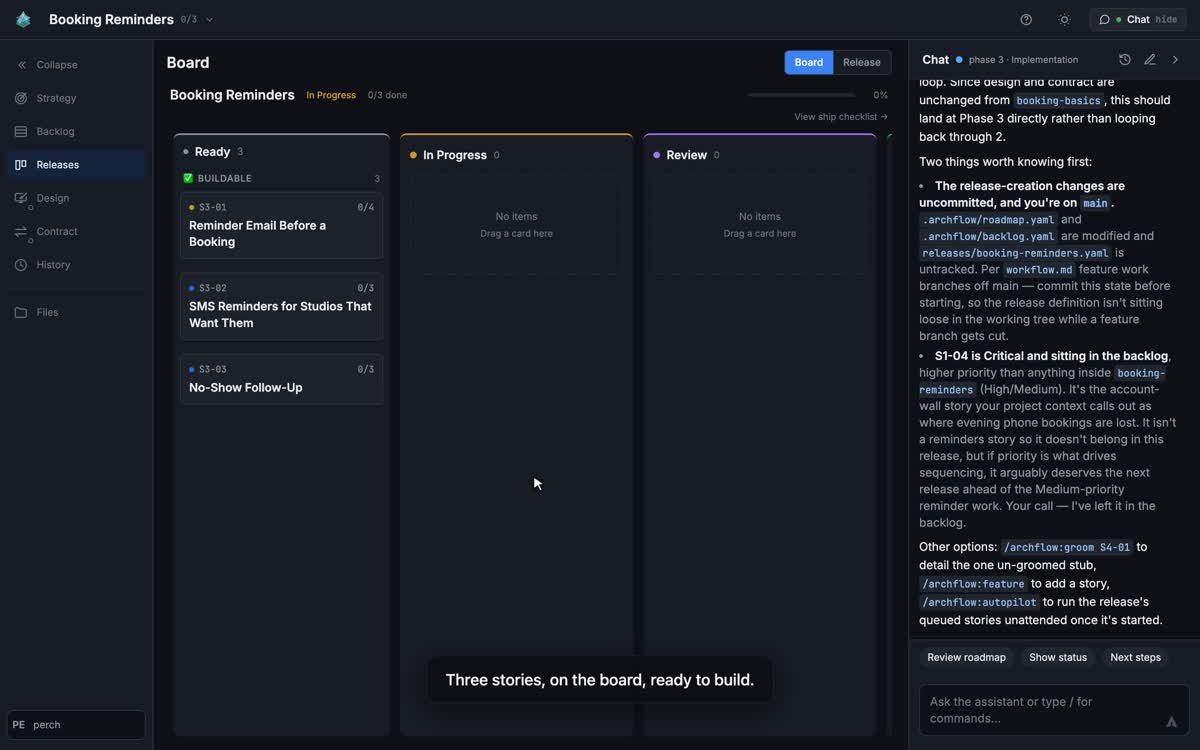
A release board: three stories groomed and ready to build, with the assistant flagging what is still
uncommitted on main.
The part that matters for a first look: you do not have to onboard in the terminal first. Point
Studio at a repo with no .archflow/ and it offers to onboard it from a button. The nine analysis
passes run in the browser, and you watch the board fill in with what they found in your code. You
approve the artifacts; nothing is written until you do.
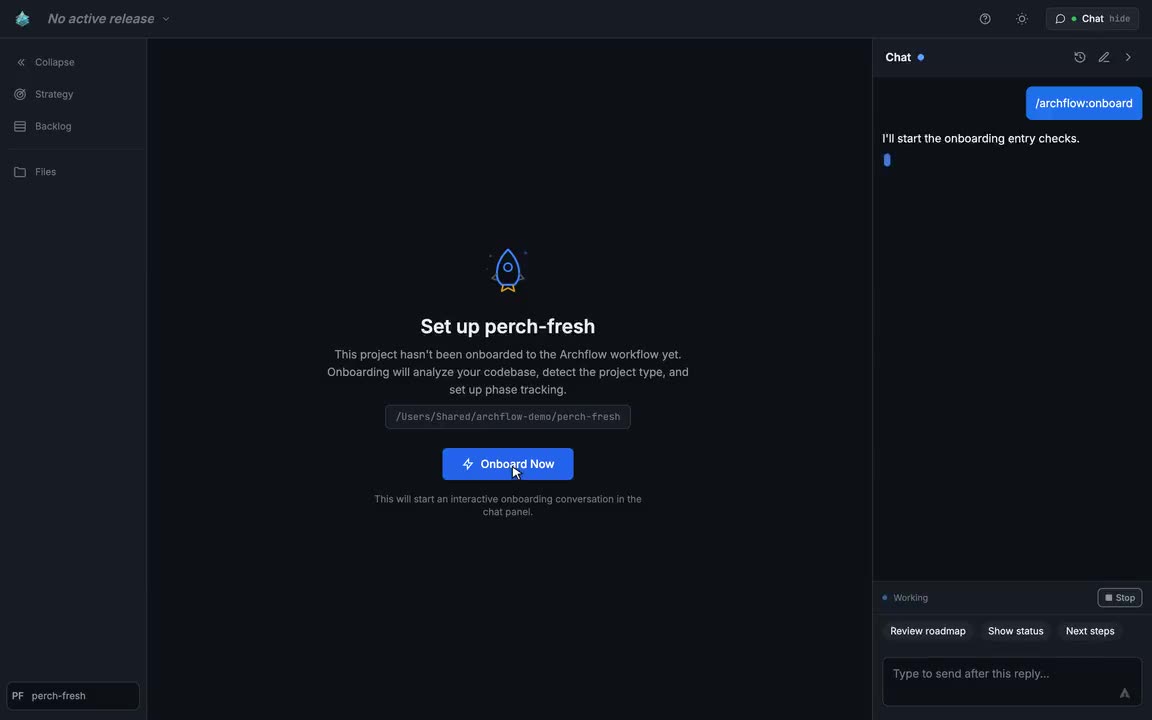
A repository with no .archflow/ yet. One button, and the analysis passes start in the panel beside
the board.
That is the actual day-one experience I want judged. Not “install a framework, read the docs, learn some commands” — open a repository you already have and watch a plan assemble itself out of it.
Studio is beta; features are still landing. It needs Claude Code, because it drives the claude
binary; the rest of Archflow does not. It runs locally, and nothing leaves your machine — no server
holds, caches or brokers your .archflow/ folder. It is also what ships Studio itself, so it
is not fragile, but it is not finished either.
Where BMAD wins, plainly
- Reach. Its skills load into any skills-capable tool, with nothing to generate per host.
Archflow runs on Claude Code, OpenAI Codex, GitHub Copilot CLI, Cursor, Gemini CLI and OpenCode,
plus a generic
AGENTS.mdand Agent Skills package for anything else, but that generic tier runs the roles serially with no sub-agents and no hooks. If your team is on a tool outside that list, BMAD is the lighter fit. - Less to maintain. No plan state to keep true. If your repo already has a good
AGENTS.md, the v6 brownfield path is close to zero setup, and that is a real advantage over nine analysis passes. - Community. Roughly 52,800 stars, an active Discord, community-built extensions and a large body of third-party tutorials. Archflow has 26 stars and no Discord yet. When you get stuck at 2am, that gap is the whole difference.
- Maturity. At v6.12.0, with a documented upgrade path and visible consolidation — v6.11.0 cut its core skills from fourteen to eight. Archflow is at v2.4.0 and six months old.
- From-scratch ceremony. Its greenfield path is older, more travelled, and has far more public
write-ups than mine. Archflow’s
product-strategistresearches the market and writes personas, KPIs and positioning, and the phases after it produce a backlog, a design system and a contract before code — but the only person who has written up that path is me.
Where Archflow wins
- Archaeology depth. Nine analysis passes producing design system, styled DSL, API contract, roadmap, backlog and a reconciled release history — not one documentation task.
- Contract-first parallel build. Frontend and backend build simultaneously against a shared, binding contract.
- The release model. Releases as the outer loop, with acceptance evidence per story and a ship
ritual that appends to
history.yaml. - Ceremony that scales.
quickmode records gates without blocking;fullmode enforces them. Same schema, and the upgrade is offered, never forced. - It stops. Autopilot runs queued stories on one branch, parks on any question only you can
answer, and never merges to
main— aPreToolUsehook enforces that on Claude Code, and a gitpre-pushguard does the same job on hosts without one. - You can look at it. Studio (beta) turns the same files into a board and a pipeline, and can run onboarding itself, so the plan is visible on day one rather than after you learn the commands.
Side by side
| Archflow | BMAD-METHOD | |
|---|---|---|
| Licence | MIT | MIT |
| Runtimes | Claude Code, OpenAI Codex, GitHub Copilot CLI, Cursor, Gemini CLI and OpenCode, plus an AGENTS.md + Agent Skills package |
Claude Code, Codex, other skills-capable tools |
| Existing codebase | Nine-pass onboarding, once, upfront; reconstructs roadmap, releases and history | bmad-project-context writes AGENTS.md; bmad-build investigates per change |
| Specialists | 17 agents across 6 phases | Eight consolidated core skills as of v6.11.0 |
| API contract | Single binding file; two agents and QA enforced against it | Per-change investigation of the existing code |
| Unit of delivery | A release, with per-story acceptance evidence | A story cycle |
| Maturity | v2.4.0, six months, 26 stars | v6.12.0, ~52.8k stars, established community |
| Writes during setup | Proposes, then waits for approval | Installs to _bmad/ and _bmad-output/; bmad-project-context writes AGENTS.md |
How do I try Archflow?
One command, from your project root. It detects the coding agents on your machine and sets Archflow up for each of them:
npx archflow install
On Claude Code you can also install it as a plugin:
claude plugin marketplace add AZidan/archflow
Then pick a path. If you want to see it, open Studio and let it drive (Claude Code only; Studio
drives the claude binary):
/archflow:studio
Point it at a repository that already has code and take the onboarding button. You watch the passes run and the board fill in.
If you would rather stay in the terminal:
/archflow:onboard
Either way it reads, analyzes and proposes. Nothing is written until you approve it, so the honest test is to point it at your messiest repo and read the gap report. No signup, no account, nothing leaves your machine.
If it tells you something about your own codebase you did not know, that is the pitch. If it does not, you have lost ten minutes and you should go use BMAD.
See also: Archflow vs gstack — a plan that follows the person versus a plan that follows the repo.
Archflow is MIT and is built with itself — .archflow/ is in its own repository. Windows is shipped
but not fully verified.